
Boundary Scan (JTAG / IEEE 1149.1)
🔷 Introduction
Boundary Scan (IEEE 1149.1) provides a standardized method to access I/O pins and internal registers through a dedicated test access port (TAP).
It enables structural testing, board bring‑up, and system‑level diagnostics without requiring physical probes.
🔷 Why Boundary Scan Matters
- Board‑level testing
Enables interconnect testing between ICs on a PCB. - Pin‑level fault detection
Detects opens, shorts, stuck‑at faults on device pins. - Debug and bring‑up
Allows controlled access to I/O during early hardware validation. - Safety diagnostics for I/O
Supports periodic tests of digital I/O paths in safety‑critical systems.
🔷 Core Concepts
JTAG TAP Signals
| Signal | Direction | |
|---|---|---|
| TCK | Input | Clock for the TAP controller. All state transitions occur on the rising edge of TCK. |
| TMS | Input | Controls TAP state transitions. Sampled on the rising edge of TCK. |
| TDI | Input | Serial data input for Instruction Register (IR) and Data Registers (DR). |
| TDO | Output | Serial data output from IR and DR. Valid after the falling edge of TCK. |
| TRSTN | Input (optional) | Asynchronous TAP reset (active‑low). Optional in IEEE 1149.1. |
TAP Controller
A finite‑state machine that sequences all JTAG operations (Shift‑IR, Shift‑DR, Update, Capture, etc.).
Instruction Register (IR)
Selects which test operation is active (EXTEST, INTEST, SAMPLE, BYPASS…).
Boundary Scan Register (BSR)
A chain of boundary cells placed at each I/O pin.
Each cell can capture, shift, or drive pin values.
Key Instructions
- EXTEST
Drives pins from the boundary register and captures external signals.
Used for board‑level interconnect testing. - INTEST
Drives internal logic through boundary cells.
Used for internal testing without affecting pins. - SAMPLE / PRELOAD
Captures pin values during normal operation or preloads data into the BSR.
🔷 Safety Connection
Boundary Scan contributes to digital I/O safety by enabling:
- Detection of open/short faults on input and output pins
- Testing of external watchdogs, PMICs, and safety monitors
- Non‑intrusive diagnostics during system operation (SAMPLE)
- Periodic I/O integrity checks in safety‑critical systems (ASIL‑oriented)
🔷 Diagrams
Figure 1: TAP Controller State Machine

This figure illustrates the full IEEE 1149.1 TAP controller state machine, showing all states and transitions for both the Data Register (DR) and Instruction Register (IR) paths.
On every rising edge of TCK, the TAP samples TMS and moves to the next state accordingly.
The transition table provides a complete reference for all possible TMS‑controlled state changes, ensuring an unambiguous interpretation of the TAP behavior during JTAG operations.
Table 1: Instruction Register (IR)
| Instruction | Opcode | Selected DR | Main effect |
|---|---|---|---|
| EXTEST | 0000b | Boundary Scan Reg | Drive/capture pins via boundary cells |
| SAMPLE/PRELOAD | 0001b | Boundary Scan Reg | Capture functional pins / preload data |
| IDCODE | 0010b | IDCODE Reg | Shift out device identification code |
| BYPASS | 1111b | BYPASS Reg (1-bit) | Bypass device in the scan chain |
Table 2: Data Registers (DR)
| Selected DR | Accessed when IR = | Width | Notes |
|---|---|---|---|
| Boundary Scan Reg | EXTEST, SAMPLE/PRELOAD | N(num.cells) | One bit per boundary scan cell |
| IDCODE Reg | IDCODE | 32-bit | Fixed device identification code |
| BYPASS Reg | BYPASS | 1-bit | Simple pass‑through flip‑flop |
Figure 2: TAP Basic Operation — Shift‑DR Waveform

The diagram shows the sequence of TAP controller states and the corresponding activity on TCK, TMS, TDI, and TDO during a Data Register (DR) scan.
On each rising edge of TCK, the TAP samples TMS and TDI, advancing the state machine and shifting one bit into the DR.
On each falling edge of TCK, the next bit of the DR becomes valid on TDO.
The DR contents shown below the waveform illustrate how incoming bits (b0…b5) enter at the MSB position and propagate toward the LSB, while outgoing bits (q0…q5) are shifted out through TDO.
Figure 3: Boundary Scan Cell (Input)
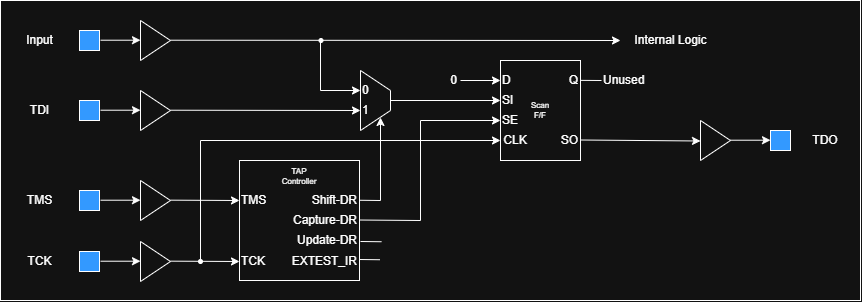
The Boundary Scan Input cell allows the test logic to capture the value present on an input pin during JTAG operations.
The pin value is loaded into the Shift Flip‑Flop during Capture‑DR, and then shifted toward TDO during Shift‑DR.
The functional logic always receives the real pin value, regardless of the TAP state.
Figure 4: Boundary Scan Cell (Output)
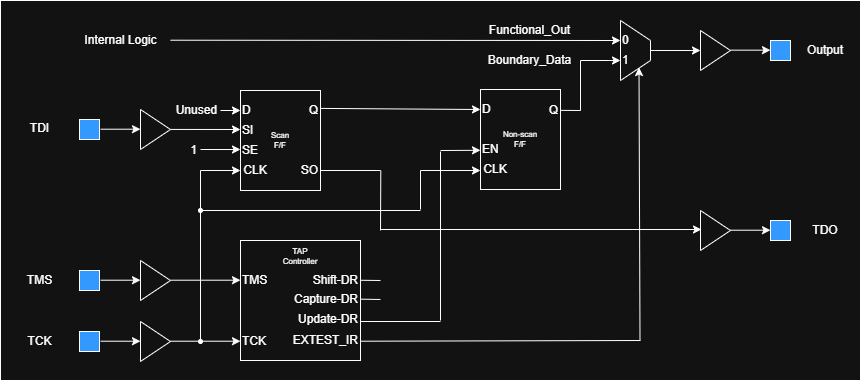
The Boundary Scan Output cell enables the test logic to drive an output pin during the EXTEST instruction.
Serial data from TDI is shifted into the Shift Flip‑Flop and transferred to the Update Flip‑Flop during Update‑DR.
When EXTEST is active, the pin is driven by the Update FF (Boundary_Data); otherwise, it follows the internal functional signal (Functional_Out).
Figure 5: Boundary Scan Cell (Bidirectional)
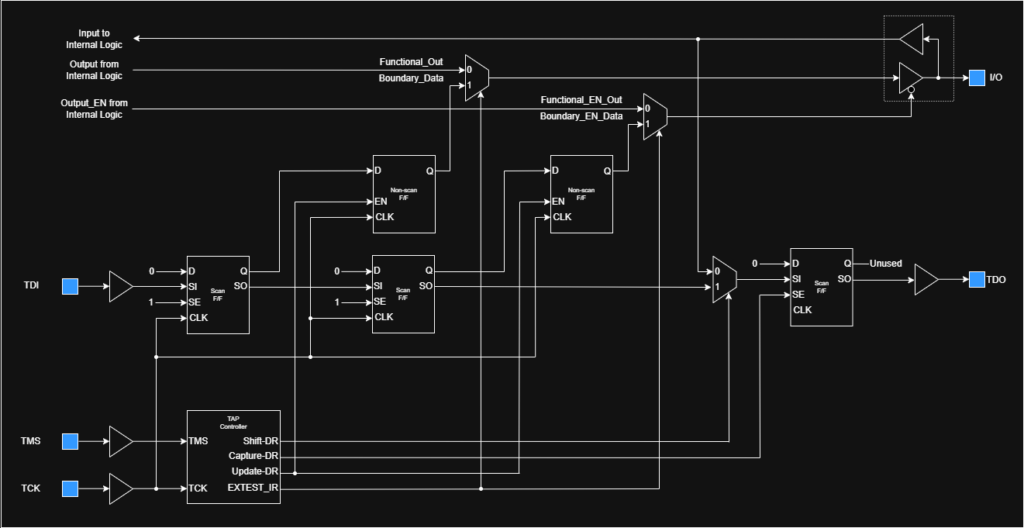
The Boundary Scan Bidirectional cell combines input capture and output drive control for pins that can operate in both directions.
The input side captures the pin value into the Shift Flip‑Flop during Capture‑DR, while the output side can drive the pin with the value stored in the Update Flip‑Flop during EXTEST.
An additional control element manages the pin’s direction, ensuring that the functional logic or the boundary scan logic drives the pin according to the current JTAG instruction.
Figure 6: Board‑level EXTEST example (IC‑to‑IC interconnect)

This example shows how boundary‑scan is used to test a PCB interconnect between two devices connected in a JTAG chain.
Device A uses its Boundary Scan Output cell to drive a test pattern onto the board net during the EXTEST instruction.
Device B uses its Boundary Scan Input cell to capture the value present on the same net during Capture‑DR and shift it out during Shift‑DR.
By comparing the driven and captured values, opens, shorts, and other interconnect faults can be detected without physical probing.
